
Last updated on
Nov 6, 2026

ADA Form S500 2012-2026 free printable template
pdfFiller is not affiliated with any government organization

Fill out
Complete the form online in a simple drag-and-drop editor.

eSign
Add your legally binding signature or send the form for signing.

Share
Share the form via a link, letting anyone fill it out from any device.

Export
Download, print, email, or move the form to your cloud storage.
Why pdfFiller is the best tool for your documents and forms


End-to-end document management
From editing and signing to collaboration and tracking, pdfFiller has everything you need to get your documents done quickly and efficiently.
Accessible from anywhere
pdfFiller is fully cloud-based. This means you can edit, sign, and share documents from anywhere using your computer, smartphone, or tablet.
Secure and compliant
pdfFiller lets you securely manage documents following global laws like ESIGN, CCPA, and GDPR. It's also HIPAA and SOC 2 compliant.
What is ADA Form S500
The ADA Form S500 is a legal document used for compliance with the Americans with Disabilities Act (ADA) to ensure accessibility standards are met.
pdfFiller scores top ratings on review platforms




This was very easy to use. I wish there were more font styles available
EXCITING AND I WANT TO LEAR MORE ABOUT IT.
Once you get used to it. I found it very easy to use.
Very useful website. Has helped in the processing of many of our business documents.
good
its a very good app to have for business
PDF Filler works great it has found every form I've ever queried
PDF Filler works great it has found every form I've ever queried. Even those really hard to find ones from Social Security or Veterans Administration
Who needs ADA Form S500?
Explore how professionals across industries use pdfFiller.

ADA Form S500 is needed by:
-
Businesses seeking to comply with ADA regulations
-
Property owners requiring ADA compliance documentation
-
Government agencies enforcing accessibility laws
-
Legal professionals advising clients on ADA matters
-
Nonprofits advocating for disability rights
Comprehensive Guide to ADA Form S500
What is the ADA Form S500
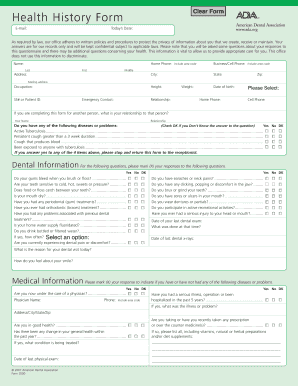
The ADA Form S500 is a critical document utilized to facilitate applications and requests pertaining to the Americans with Disabilities Act (ADA) regulations. This form serves to ensure that individuals seeking access to ADA-related services can do so efficiently. By defining its importance, users can better understand how it fits within the broader scope of ADA compliance and accessibility initiatives.
This form is particularly relevant for individuals and organizations aiming to comply with ADA stipulations, enabling them to request modifications, file grievances, or seek necessary accommodations. Understanding the comprehensive role of the ADA Form S500 is essential for effective navigation of ADA-related processes.
Purpose and Benefits of the ADA Form S500
The ADA Form S500 offers several key benefits to applicants, significantly enhancing their experience when accessing ADA-related services. By utilizing this form, applicants are provided a streamlined pathway to obtain necessary accommodations or address concerns under ADA guidelines.
Not only does using the form facilitate easier access to vital services, but it also ensures that applicants can effectively communicate their needs. Many have experienced positive outcomes by correctly filling out the ADA Form S500, ranging from timely accommodations to successful resolutions of access issues.
Who Needs the ADA Form S500
The ADA Form S500 is essential for various groups who need to file for ADA-related requests. This includes individuals with disabilities seeking accommodations in workplaces, educational institutions, or public services. Organizations providing support to these individuals may also need this form to ensure compliance with ADA regulations.
Specific situations that necessitate the use of this form include requesting modifications for accessibility, filing grievances based on discrimination, or seeking assistance with navigating ADA-related challenges. Understanding the eligibility criteria is crucial to ensure the correct application of this form.
How to Fill Out the ADA Form S500 Online (Step-by-Step)
Filling out the ADA Form S500 online is a straightforward process when utilizing pdfFiller. Follow these steps to complete the form:
-
Access the ADA Form S500 template through the pdfFiller platform.
-
Gather all necessary information and documents, including personal details and specifics about the ADA request.
-
Input the required information in the designated fields of the form.
-
Review each section for completeness and accuracy.
-
Use pdfFiller features such as auto-save to ensure no data is lost.
-
Proceed to eSign the document if required before submission.
By leveraging pdfFiller’s user-friendly features, applicants can efficiently complete and submit the form online.
Common Errors and How to Avoid Them
When filling out the ADA Form S500, applicants often encounter several common pitfalls. Frequent mistakes include incomplete sections, inaccurate personal information, and unclear descriptions of the requested accommodations. These errors can delay processing or lead to outright denial of requests.
To avoid these mistakes, applicants should review all instructions carefully and double-check their entries for accuracy before submission. It is also advisable to have another individual review the completed form to ensure clarity and completeness.
How to Submit the ADA Form S500
Submitting the ADA Form S500 can be done through several methods, making it accessible for different user preferences. Here are the primary submission methods:
-
Online submission via the pdfFiller platform for immediate processing.
-
Mail the form to the relevant ADA office; ensure to check for any required postal information.
-
Faxing the form, if applicable, to comply with local regulations.
Each submission method has its own considerations, so it’s essential to confirm receipt and tracking options for mailed or faxed forms to ensure they are processed promptly.
Consequences of Not Filing or Late Filing the ADA Form S500
Failing to file or submitting the ADA Form S500 late can result in significant risks and penalties. Not filing could lead to missing out on essential ADA benefits or accommodations that may be crucial for accessibility.
Additionally, late filings may jeopardize the evaluation of requests, potentially causing delays in achieving necessary accommodations. To mitigate these risks, it’s advised to adhere to submission deadlines and maintain reminders for important filing dates.
Security and Compliance for the ADA Form S500
Security is paramount when handling sensitive information associated with the ADA Form S500. pdfFiller employs advanced security measures to safeguard personal data, including 256-bit encryption and adherence to regulatory standards such as HIPAA and GDPR.
Users are encouraged to utilize best practices for protecting their information, such as avoiding shared devices and logging out of accounts after use. Understanding these security protocols helps ensure that personal information remains confidential throughout the process.
How pdfFiller Can Help You with the ADA Form S500
pdfFiller provides a comprehensive suite of features that simplify the process of filling out and submitting the ADA Form S500. Key capabilities include easy editing, efficient eSigning, and straightforward submission options that enhance user experience.
User testimonials highlight the platform’s effectiveness in facilitating successful submissions and maintaining data security. Adopting pdfFiller tools ensures that individuals can navigate the complexities of the ADA process with confidence.
User-Friendly Features of pdfFiller to Enhance Your Experience
pdfFiller offers a variety of features designed to enhance the user experience when working with the ADA Form S500. Some of these features include:
-
eSigning capabilities that streamline the signing process.
-
Tools for creating fillable forms, making it easy to include required information.
-
Options for document sharing, enabling quick collaboration with advisors or advocates.
Additionally, users can access templates and examples of the ADA Form S500, making it easier to visualize the completed form. Customer support resources are also readily available for those who need further assistance.
How to fill out the ADA Form S500
-
1.To access the ADA Form S500 on pdfFiller, navigate to the website and use the search bar to find the form by typing its name.
-
2.Once located, click on the form to open it in pdfFiller's interface, where you can view and edit the document.
-
3.Before completing the form, gather all necessary information including details about your property, the specific ADA requirements, and any relevant compliance records.
-
4.Use pdfFiller’s tools to fill in the required fields clearly and accurately. Click on each field to type or select your input directly.
-
5.After filling in all fields, review your document within pdfFiller to ensure there are no errors or missing information.
-
6.Once satisfied with your completion, you can save the form to your account or download it directly to your device.
-
7.To submit the form, follow the submission guidelines provided by the local jurisdiction or agency specific to the ADA compliance.

Who is eligible to file the ADA Form S500?
Any business or organization that is required to comply with the Americans with Disabilities Act can file the ADA Form S500. This includes any property owners, government entities, and non-profit organizations that provide public services.
What documents do I need to submit with the ADA Form S500?
Generally, you may need to include supporting documents such as property plans, existing compliance reports, and any correspondence related to ADA compliance. Check local regulations for specific requirements.
Are there any deadlines for submitting the ADA Form S500?
Deadlines may vary based on local jurisdiction and the specific requirements of the ADA compliance process. It is important to consult local guidelines to ensure timely submission.
Can I file the ADA Form S500 online?
Yes, you can complete and submit the ADA Form S500 through platforms like pdfFiller, which streamline the filing process and allow for electronic submissions depending on local rules.
What common mistakes should I avoid when filling in the ADA Form S500?
Common mistakes include leaving fields blank, providing inaccurate information, or failing to include required supporting documents. Always double-check for accuracy before submitting.
How long does it take to process the ADA Form S500?
Processing times can vary widely; typically, you can expect a response within a few weeks to months depending on the complexity of your form and the local authority's workload.
What happens if my ADA Form S500 is rejected?
If your form is rejected, you will typically receive feedback outlining the reasons. You are allowed to correct the errors and resubmit the form within the specified timeframe.
ADA Form S500 Form Versions
Related Content
Related Forms




Related Catalogs
Get the latest insights from our blog


If you believe that this page should be taken down, please follow our DMCA take down process
here
.
This form may include fields for payment information. Data entered in these fields is not covered by PCI DSS compliance.